这篇文章上次修改于 1164 天前,可能其部分内容已经发生变化,如有疑问可询问作者。
漏洞说明
Windows server 2016远程桌面服务SSL加密默认是开启的,且有默认的CA证书。由于SSL/ TLS自身存在漏洞缺陷,当开启远程桌面服务,使用漏洞扫描工具扫描,发现存在SSL/TSL漏洞。
例如如下漏洞: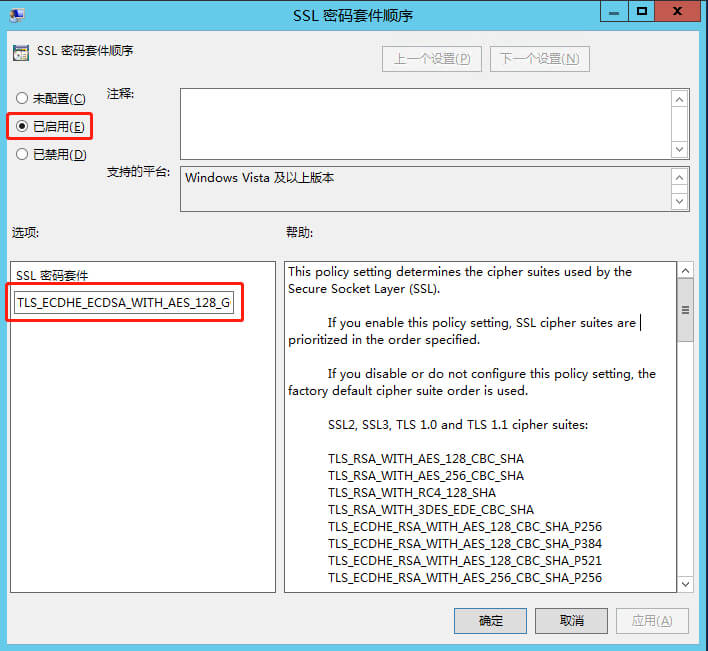
修复办法
1、登录服务器,打开windows powershell,运行gpedit.msc,打开“本地组策略编辑器”。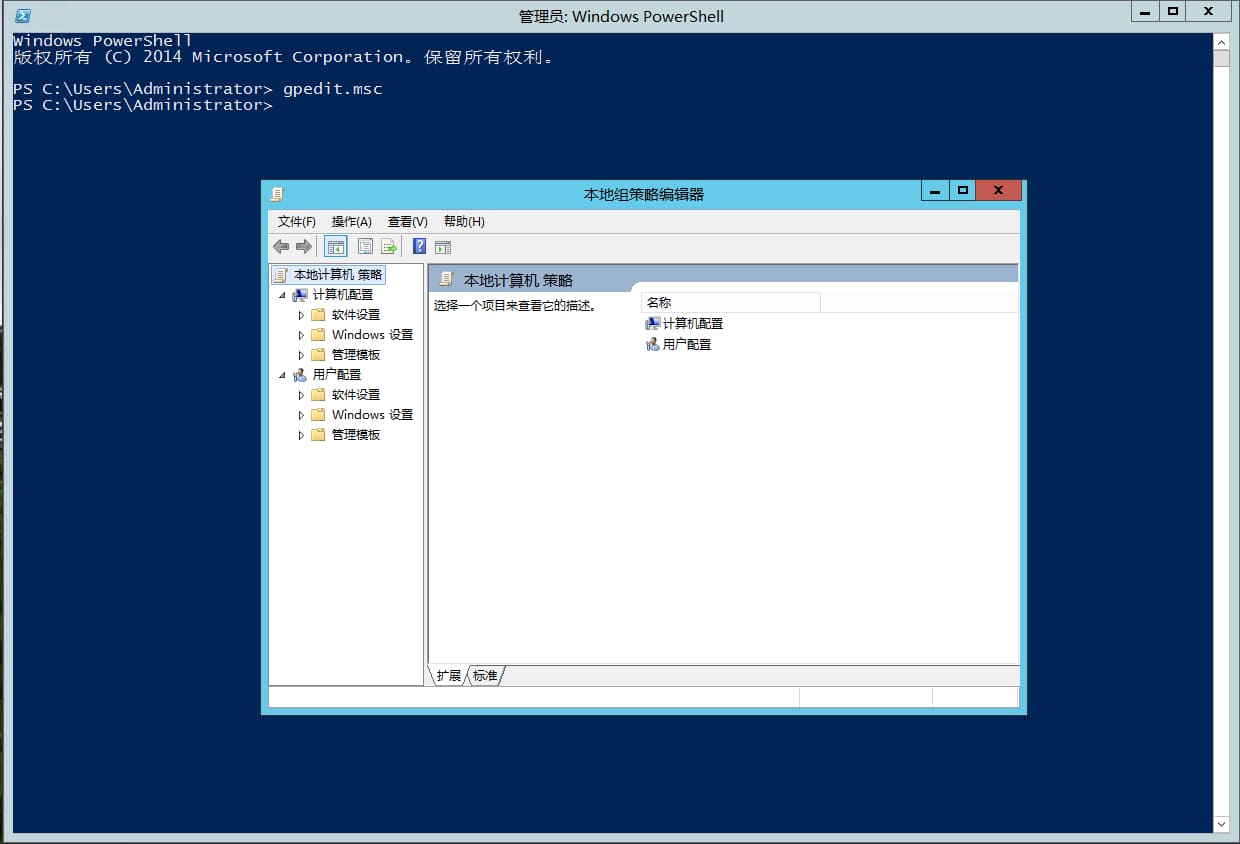
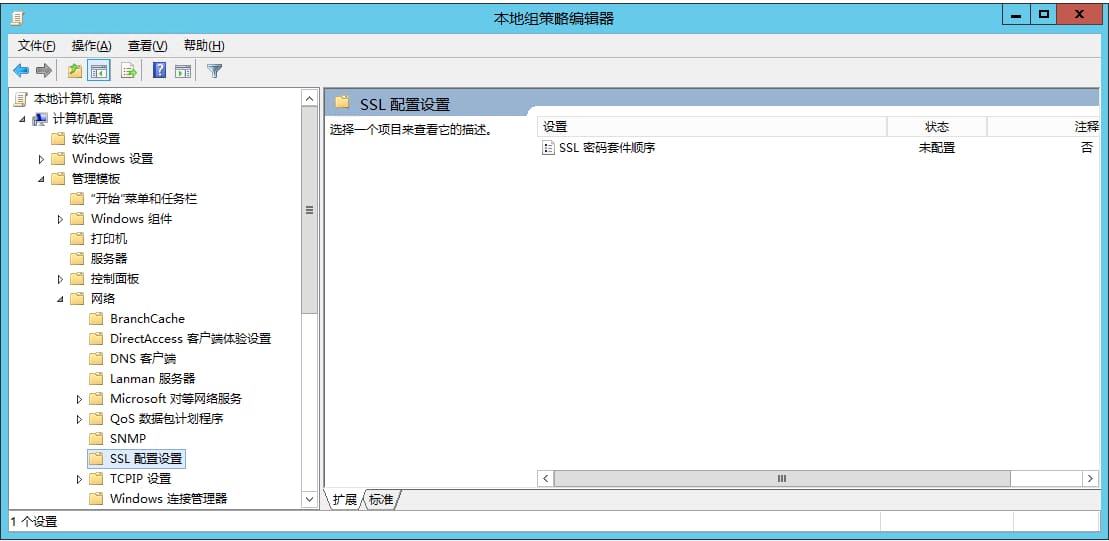
2、打开“本地组策略编辑器”-“计算机配置”-“管理模板”-“网络”-“SSL配置设置”, 在“SSL密码套件顺序”选项上,右键“编辑”。
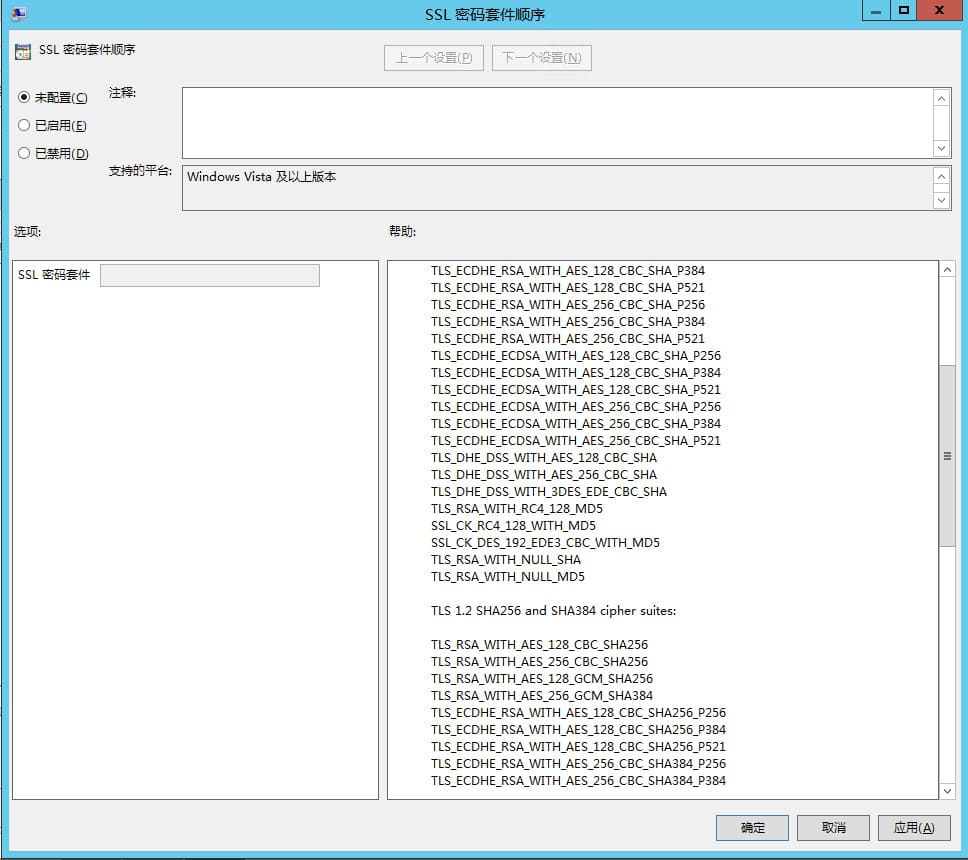
3、在“SSL密码套件顺序”选在“已启用(E)” ,在“SSL密码套件”下修改SSL密码套件算法,仅保留TLS 1.2 SHA256 和 SHA384 密码套件、TLS 1.2 ECC GCM 密码套件。
删除原有内容替换为:
TLS_ECDHE_ECDSA_WITH_AES_128_GCM_SHA256_P256,TLS_ECDHE_ECDSA_WITH_AES_128_GCM_SHA256_P384,TLS_ECDHE_ECDSA_WITH_AES_128_GCM_SHA256_P521,TLS_ECDHE_ECDSA,WITH_AES_256_GCM_SHA384_P384,TLS_ECDHE_ECDSA_WITH_AES_256_GCM_SHA384_P521,TLS_RSA_WITH_AES_128_CBC_SHA256,TLS_RSA_WITH_AES_256_CBC_SHA256,TLS_ECDHE_RSA_WITH_AES_128_CBC_SHA256_P256,TLS_ECDHE_RSA_WITH_AES_128_CBC_SHA256_P384,TLS_ECDHE_RSA_WITH_AES_128_CBC_SHA256_P521,TLS_ECDHE_RSA_WITH_AES_256_CBC_SHA384_P256,TLS_ECDHE_RSA_WITH_AES_256_CBC_SHA384_P384,TLS_ECDHE_RSA_WITH_AES_256_CBC_SHA384_P521,TLS_ECDHE_ECDSA_WITH_AES_128_CBC_SHA256_P256,TLS_ECDHE_ECDSA_WITH_AES_128_CBC_SHA256_P384,TLS_ECDHE_ECDSA_WITH_AES_128_CBC_SHA256_P521,TLS_ECDHE_ECDSA_WITH_AES_256_CBC_SHA384_P384,TLS_ECDHE_ECDSA_WITH_AES_256_CBC_SHA384_P521,TLS_DHE_DSS_WITH_AES_128_CBC_SHA256,TLS_DHE_DSS_WITH_AES_256_CBC_SHA256,TLS_RSA_WITH_NULL_SHA,TLS_RSA_WITH_AES_128_CBC_SHA,TLS_DHE_DSS_WITH_AES_128_CBC_SHA
修改后,点击“应用”、“确定”,即可。
原本内容为:
TLS_ECDHE_ECDSA_WITH_AES_256_GCM_SHA384,TLS_ECDHE_ECDSA_WITH_AES_128_GCM_SHA256,TLS_ECDHE_RSA_WITH_AES_256_GCM_SHA384,TLS_ECDHE_RSA_WITH_AES_128_GCM_SHA256,TLS_DHE_RSA_WITH_AES_256_GCM_SHA384,TLS_DHE_RSA_WITH_AES_128_GCM_SHA256,TLS_ECDHE_ECDSA_WITH_AES_256_CBC_SHA384,TLS_ECDHE_ECDSA_WITH_AES_128_CBC_SHA256,TLS_ECDHE_RSA_WITH_AES_256_CBC_SHA384,TLS_ECDHE_RSA_WITH_AES_128_CBC_SHA256,TLS_ECDHE_ECDSA_WITH_AES_256_CBC_SHA,TLS_ECDHE_ECDSA_WITH_AES_128_CBC_SHA,TLS_ECDHE_RSA_WITH_AES_256_CBC_SHA,TLS_ECDHE_RSA_WITH_AES_128_CBC_SHA,TLS_DHE_RSA_WITH_AES_256_CBC_SHA,TLS_DHE_RSA_WITH_AES_128_CBC_SHA,TLS_RSA_WITH_AES_256_GCM_SHA384,TLS_RSA_WITH_AES_128_GCM_SHA256,TLS_RSA_WITH_AES_256_CBC_SHA256,TLS_RSA_WITH_AES_128_CBC_SHA256,TLS_RSA_WITH_AES_256_CBC_SHA,TLS_RSA_WITH_AES_128_CBC_SHA,TLS_RSA_WITH_3DES_EDE_CBC_SHA,TLS_DHE_DSS_WITH_AES_256_CBC_SHA256,TLS_DHE_DSS_WITH_AES_128_CBC_SHA256,TLS_DHE_DSS_WITH_AES_256_CBC_SHA,TLS_DHE_DSS_WITH_AES_128_CBC_SHA,TLS_DHE_DSS_WITH_3DES_EDE_CBC_SHA,TLS_RSA_WITH_RC4_128_SHA,TLS_RSA_WITH_RC4_128_MD5,TLS_RSA_WITH_NULL_SHA256,TLS_RSA_WITH_NULL_SHA,TLS_PSK_WITH_AES_256_GCM_SHA384,TLS_PSK_WITH_AES_128_GCM_SHA256,TLS_PSK_WITH_AES_256_CBC_SHA384,TLS_PSK_WITH_AES_128_CBC_SHA256,TLS_PSK_WITH_NULL_SHA384,TLS_PSK_WITH_NULL_SHA256
4、重启服务器即可。
禁止使用RC4加密算法
需要禁止 RC4 加密算法时,可以通过设置以下注册表项来完全禁用 RC4 密码套件。通此时,任何只能使用 RC4 的客户端或服务器将不再能连接到你的服务器。部署此设置的客户端将无法连接到需要 RC4 的站点,部署此设置的服务器将无法为必须使用 RC4 的客户端提供服务。
- [HKEY_LOCAL_MACHINE\SYSTEM\CurrentControlSet\Control\SecurityProviders\SCHANNEL\Ciphers\RC4 128/128]
“Enabled”=dword:00000000- [HKEY_LOCAL_MACHINE\SYSTEM\CurrentControlSet\Control\SecurityProviders\SCHANNEL\Ciphers\RC4 40/128]
“Enabled”=dword:00000000- [HKEY_LOCAL_MACHINE\SYSTEM\CurrentControlSet\Control\SecurityProviders\SCHANNEL\Ciphers\RC4 56/128]
“Enabled”=dword:00000000
Solve Sweet32
提供的脚本如下
<#
.Synopsis
   Solve Sweet32 Short description
.DESCRIPTION
   Long description
.EXAMPLE
   Example of how to use this cmdlet
.EXAMPLE
   Another example of how to use this cmdlet
.INPUTS
   Inputs to this cmdlet (if any)
.OUTPUTS
   Output from this cmdlet (if any)
.NOTES
   General notes
.COMPONENT
   The component this cmdlet belongs to
.ROLE
   The role this cmdlet belongs to
.FUNCTIONALITY
   The functionality that best describes this cmdlet
#>

[CmdletBinding()]
param(
    [Parameter(position=0,Mandatory=$false)][ValidateSet("SWEET32","TLS1.0","Both")]$Solve="Both"
)

function Write-Log{
    [CmdletBinding()]
    #[Alias('wl')]
    [OutputType([int])]
    Param(
        # The string to be written to the log.
        [Parameter(Mandatory=$true,
                   ValueFromPipelineByPropertyName=$true,
                   Position=0)]
        [ValidateNotNullOrEmpty()]
        [Alias("LogContent")]
        [string]$Message,

        # The path to the log file.
        [Parameter(Mandatory=$false,
                   ValueFromPipelineByPropertyName=$true,
                   Position=1)]
        [Alias('LogPath')]
        [string]$Path=$DefaultLog,

        [Parameter(Mandatory=$false,
                    ValueFromPipelineByPropertyName=$true,
                    Position=2)]
        [ValidateSet("Error","Warn","Info","Load","Execute")]
        [string]$Level="Info",

        [Parameter(Mandatory=$false)]
        [switch]$NoClobber
    )


    Process{

        if ((Test-Path $Path) -AND $NoClobber) {
            Write-Warning "Log file $Path already exists, and you specified NoClobber. Either delete the file or specify a different name."
            Return
        }

        # If attempting to write to a log file in a folder\/path that doesn't exist
        # to create the file include path.
        elseif (!(Test-Path $Path)) {
            Write-Verbose "Creating $Path."
            $NewLogFile = New-Item $Path -Force -ItemType File
        }

        else {
            # Nothing to see here yet.
        }

        # Now do the logging and additional output based on $Level
        switch ($Level) {
            'Error' {
                Write-Host $Message -ForegroundColor Red
                Write-Output "$(Get-Date -Format "yyyy-MM-dd HH:mm:ss") ERROR: `t $Message" | Out-File -FilePath $Path -Append
                break;
            }
            'Warn' {
                Write-Warning $Message
                Write-Output "$(Get-Date -Format "yyyy-MM-dd HH:mm:ss") WARNING: `t $Message" | Out-File -FilePath $Path -Append
                break;
            }
            'Info' {
                Write-Host $Message -ForegroundColor Green
                Write-Verbose $Message
                Write-Output "$(Get-Date -Format "yyyy-MM-dd HH:mm:ss") INFO: `t $Message" | Out-File -FilePath $Path -Append
                break;
            }
            'Load' {
                Write-Host $Message -ForegroundColor Magenta
                Write-Verbose $Message
                Write-Output "$(Get-Date -Format "yyyy-MM-dd HH:mm:ss") LOAD: `t $Message" | Out-File -FilePath $Path -Append
                break;
            }
            'Execute' {
                Write-Host $Message -ForegroundColor Cyan -BackgroundColor DarkBlue
                Write-Verbose $Message
                Write-Output "$(Get-Date -Format "yyyy-MM-dd HH:mm:ss") EXEC: `t $Message" | Out-File -FilePath $Path -Append
                break;
            }
        }
    }
}
function Test-RegistryValue {
    param (
        [parameter(Mandatory=$true)] [ValidateNotNullOrEmpty()]$Path,
        [parameter(Mandatory=$true)] [ValidateNotNullOrEmpty()]$Value
    )
    try{
        if( (Get-ItemProperty -Path $Path | Select-Object -ExpandProperty $Value -ErrorAction Stop) -eq 0 ){
            return  $true
        }
        return $false
    }
    catch{
        return  $true
    }
}
function Test-RegistryProperty {
    param (
        [parameter(Mandatory=$true)] [ValidateNotNullOrEmpty()]$Path,
        [parameter(Mandatory=$true)] [ValidateNotNullOrEmpty()]$Value
    )
    try{
        if( (Get-ItemProperty -Path $Path | Select-Object -ExpandProperty $Value) -eq 0 ){
            return  $true
        }
        return $false
    }
    catch{
        return  $true
    }
}

$Global:CleanUpGlobal=@()
$Global:CleanUpVar=@()

$global:ScriptLocation = $(get-location).Path
$global:DefaultLog = "$global:ScriptLocation\Sweet32.log"

$Global:CleanUpGlobal+="ScriptLocation"
$Global:CleanUpGlobal+="DefaultLog"
################################################################################SWEET32######################################################################
###                 Source : https:\/\/bobcares.com\/blog\/how-to-fix-sweet32-birthday-attacks-vulnerability-cve-2016-2183\/3\/                                 ###
################################################################################SWEET32######################################################################

if( ($Solve -eq "Both") -or ($Solve -eq "SWEET32") ){
    Write-Log -Level Load -Message "Solving vulnerability --> SWEET32"

    $TripleDES168="HKLM:\SYSTEM\CurrentControlSet\Control\SecurityProviders\SCHANNEL\Ciphers\Triple DES 168\/168"
    $testkey = Test-path $TripleDES168

    #Create Key Triple DES 168 (A key is a folder in the registry)
    if(!$testkey){
        Write-Log -Level info -Message "Creating Key $TripleDES168"
        New-Item -Path $TripleDES168 -Force | Out-Null
    }
    else{
        Write-Log -Level Warn -Message "They key already exits ($TripleDES168)"
    }

    #Create The property "Enabled" with value 0
    $testentry= Test-RegistryValue -Path $TripleDES168 -Value "Enabled"
    if(!$testentry){
        Write-Log -Level Info -Message "Creating new Enabled Property with value 0"
        New-ItemProperty -PropertyType DWORD -Path $TripleDES168 -Name "Enabled" -Value 0  -Force | Out-Null
    }
    else{
        Write-Log -Level Info -Message "The registry entry with property enabled = 0, already exists"
    }
}

#############################################################################################################################################################
###   Protocols : https:\/\/blogs.msdn.microsoft.com\/friis\/2016\/07\/25\/disabling-tls-1-0-on-your-windows-2008-r2-server-just-because-you-still-have-one\/     ###
#############################################################################################################################################################

if( ($Solve -match "Both") -or ($Solve -match "TLS1.0") ){

    Write-Log -Level Load -Message "Solving vulnerability --> TLS1.0"

    #Define Variables and Arrays
    $TLSRoot = "HKLM:\SYSTEM\CurrentControlSet\Control\SecurityProviders\SCHANNEL\Protocols"
    $TLSArray =@("TLS 1.0","TLS 1.1","TLS 1.2")
    $ClientServer= @("Client","Server")

    foreach($tls in $TLSArray){ #foreach root item check if it's there,
        $rootpath = "$TLSRoot\$tls"

        if(! (Test-Path $rootpath)){ #if it's doesn't exists, create it  (Remember a key is a folder in registry).
            Write-Log -Level Info -Message "Create new Key ($rootpath)"
            new-item -Path $rootpath -Force | Out-Null
        }

        foreach($cs in $ClientServer){ #cs => Client\/Server array.
            $cspath = "$rootpath\$cs"

            if(! (Test-Path $cspath) ){ #check if the cspath exists (if not create it, if it is, check the property "Enabled" for TLS 1.0 and TLS 1.1 , and "DisabledByDefault" for TLS 1.2
                New-Item -Path "$cspath" -Force | Out-Null
                if($tls -eq "TLS 1.0" -or $tls -eq "TLS 1.1"){ #If tls 1.0 enabled 0 (disabled)
                    if(! (Test-RegistryProperty  "$cspath" -Value "Enabled")){
                        Write-Log -Level Info -Message "Creating new property Enabled = 0 for $tls in ($cspath)"
                        New-ItemProperty -PropertyType DWORD -Path "$cspath" -Name "Enabled" -Value 0 -Force | Out-Null
                        New-ItemProperty -PropertyType DWORD -Path "$cspath" -Name "DisabledByDefault" -Value 1 -Force | Out-Null
                    }
                }
                else{ #if tls 1.2 (is not disabled by default and it's enabled
                    if(! (Test-RegistryProperty "$cspath" -Value "DisabledByDefault")){
                        Write-Log -Level Info -Message "Creating 'Enabled' and 'DisabledByDefault' for $tls in ($cspath)"
                        New-ItemProperty -PropertyType DWORD -Path "$cspath" -Name "DisabledByDefault" -Value 0 -Force | Out-Null
                        New-ItemProperty -PropertyType DWORD -Path "$cspath" -Name "Enabled" -Value 4294967295 -Force | Out-Null #Enable tls 1.0 or 1.1
                    }
                }
            }
            else{ #if the root exists Check the property Enabled for tls1.0 and "Disabledbydefault" for
                if($tls -eq "TLS 1.0" -or $tls -eq "TLS 1.1"){ #If tls 1.0 enabled 0 (disabled)
                    if(! (Test-RegistryProperty  "$cspath" -Value "Enabled")){
                        Write-Log -Level Info -Message "Creating new property Enabled = 0 for $tls in ($cspath)"
                        New-ItemProperty -PropertyType DWORD -Path "$cspath" -Name "Enabled" -Value 0 -Force | Out-Null
                        New-ItemProperty -PropertyType DWORD -Path "$cspath" -Name "DisabledByDefault" -Value 1 -Force | Out-Null
                    }
                }
                else{
                    if(! (Test-RegistryProperty "$cspath" -Value "DisabledByDefault")){
                        Write-Log -Level Info -Message "Creating 'Enabled' and 'DisabledByDefault' for $tls in ($cspath)"
                        New-ItemProperty -PropertyType DWORD -Path "$cspath" -Name "DisabledByDefault" -Value 0 -Force | Out-Null
                        New-ItemProperty -PropertyType DWORD -Path "$cspath" -Name "Enabled" -Value 4294967295 -Force| Out-Null
                    }
                }
            }
        }
    }
}

Write-Log -Level Info "Cleaning up variables"
    $CleanUpVar | ForEach-Object{
        Remove-Variable $_
    }
    $CleanUpGlobal | ForEach-Object{
        Remove-Variable -Scope global $_
    }
更新windows
如果服务器可以联网,及时更新安全更新补丁
